

The best GPU for Ryzen 5 5500 gaming in 2026 is the NVIDIA GeForce RTX 3060 12GB for most buyers. It pairs cleanly with this 6 core budget CPU, its 12GB of video memory handles modern 1080p games without texture compromises, and its full x16 PCIe interface means it loses almost nothing on the 5500’s older PCIe 3.0 platform. If your budget is tighter, the AMD Radeon RX 6600 is the value pick. If you want a realistic shot at 1440p, step up to the RX 6700 XT 12GB and accept that you will tune settings. Do not buy a flagship card for this CPU. Anything above the RTX 3060 Ti or RX 6700 XT class spends money on performance this processor cannot consistently feed, especially at 1080p.
Why the Ryzen 5 5500 Is Still Worth Building Around
The Ryzen 5 5500 is a 6 core, 12 thread processor built on AMD Zen 3 architecture for the AM4 socket. It runs at a 3.6 GHz base clock with a 4.2 GHz boost clock, carries 16MB of L3 cache, and has a 65W TDP. It supports DDR4 memory up to 3200 MHz and uses PCIe Gen 3. It has no integrated graphics, so a dedicated card is not optional, it is required for any display output at all.
That spec sheet explains both the appeal and the ceiling. Six Zen 3 cores are still enough for modern games at 1080p, because most games lean on a few fast cores rather than on core count alone. The 65W power draw keeps cooling cheap, since the included Wraith Stealth cooler is adequate for stock operation in a case with basic airflow. And the AM4 platform is the real bargain: boards and DDR4 memory are widely available, and our guide to the best AM4 CPU for gaming notes that staying on AM4 costs roughly 30 to 40 percent less than switching to AM5. For a builder whose total budget is tight, that saving goes straight into a better graphics card, which is where gaming performance actually comes from.
The ceiling matters too. The 16MB of L3 cache is half what the Ryzen 5 5600 offers, and the PCIe 3.0 interface is a generation behind current cards. Neither fact ruins the chip, but both shape which GPU makes sense, and both are covered in detail below. The short version: buy a mid range card, not a flagship, and prefer cards whose design is forgiving of an older platform.
The Picks at a Glance
| GPU | VRAM | Board power | PCIe interface | Best for |
|---|---|---|---|---|
| GTX 1660 Super | 6GB GDDR6 | 125W | x16 | Tightest budgets, esports, older titles |
| RX 6600 | 8GB GDDR6 | 132W | x8 | Best value 1080p gaming |
| RX 6600 XT | 8GB GDDR6 | 160W | x8 | Faster 1080p high refresh |
| RTX 3060 12GB | 12GB GDDR6 | 170W | x16 | Best overall pairing |
| RX 7600 | 8GB GDDR6 | 165W | x8 | Newer AMD option, strong raster speed |
| RTX 4060 | 8GB GDDR6 | 115W | x8 | Most efficient, DLSS and frame generation |
| RX 6700 XT | 12GB GDDR6 | 230W | x16 | Realistic 1440p stretch pick |
| RTX 3060 Ti | 8GB GDDR6 | 200W | x16 | 1440p stretch pick for NVIDIA fans |
All power figures above are manufacturer board power or TDP ratings. All FPS figures in this guide are estimates based on published reviews and rival guides, not measurements from this site, and your results will vary by game, resolution, and settings.
Cheapest Sensible Tier GTX 1660 Super and Used RX 5700 XT
If the budget barely stretches past the CPU, board, and memory, the GTX 1660 Super is the floor worth standing on. Its 6GB of VRAM is the weak point, so you will lower texture settings in newer titles, but it plays esports games at very high frame rates and older AAA games comfortably at 1080p. It draws only 125W, so almost any decent existing power supply can run it, and it uses a full x16 interface, so PCIe 3.0 costs it nothing noticeable.
The used market offers one step up at a similar price: the RX 5700 XT. It has 8GB of VRAM and noticeably more raw speed than the 1660 Super, which makes it a genuine 1080p high settings card. The trade offs are real: it draws around 225W, it runs hotter, and buying used means checking the card’s condition carefully, which the used checklist later in this guide covers. A 5700 XT only makes sense if your power supply has the headroom and the 8 pin connectors it needs. If either answer is no, stay with the 1660 Super or save for an RX 6600.
Do not go below this tier for a gaming build. Cards with 4GB of VRAM or less will stutter in modern titles no matter how good the CPU is, because textures spill into system memory, and that is a GPU memory problem no CPU can fix.
Best Value Tier AMD RX 6600 and RX 6600 XT
The RX 6600 is the value king of this guide. It has 8GB of GDDR6 memory on a 128 bit bus, giving 224 GB/s of bandwidth, and it draws just 132W. At 1080p it handles high settings in most AAA games at smooth frame rates (estimate: 60 FPS or more in typical AAA titles at high settings, much higher in esports games), and it is cheap enough to leave money for 16GB of dual channel memory, which this platform needs. Its weakness is its PCIe x8 interface, which matters on this CPU, as explained in the PCIe section below. In practice the loss is small, a few percent in most games, and the price advantage usually outweighs it.
The RX 6600 XT is the same idea with more speed: 2048 stream processors instead of 1792, 256 GB/s of bandwidth, and 160W of board power. It is the better choice for 1080p high refresh monitors, where its extra headroom shows up in competitive titles. Both cards lack strong ray tracing performance, so if ray tracing matters to you, read the RTX 3060 section before deciding. If it does not, the RX 6600 XT is arguably the smartest money in this whole guide for a pure 1080p gamer.
Best Overall Tier NVIDIA RTX 3060 12GB
The RTX 3060 12GB is the default recommendation for a Ryzen 5 5500 build, and rival guides agree on it more than on any other card here. Three reasons explain why. First, 12GB of VRAM on a 192 bit bus gives 360 GB/s of bandwidth, which removes texture worries at 1080p and keeps 1440p playable in many titles. Second, it uses a full PCIe x16 interface, so the 5500’s PCIe 3.0 limit barely touches it. Third, it brings DLSS upscaling and solid ray tracing for its class, plus NVENC encoding if you ever stream.
At 1080p, expect high to ultra settings at smooth frame rates in AAA games (estimate: 60 FPS or more at high settings in most titles), with esports games running far above that. At 1440p, it is a medium to high settings card, not an ultra settings card, and DLSS helps close the gap in supported games. Rival testing summaries report only a small bottleneck with this pairing, roughly 3 to 5 percent in CPU heavy games, and that matches the logic: the 5500 is fast enough to feed a mid range card, and the 3060 is not so fast that it constantly waits on the CPU. If you buy one card from this guide without overthinking it, buy this one.
Newer Efficient Tier RX 7600 and RTX 4060
If you prefer a new card with a warranty and current features, two options stand out. The RX 7600 is the newer AMD pick, with 8GB of GDDR6, a 128 bit bus, and 165W of board power. In raw raster performance it trades blows with the RTX 3060, sometimes winning, sometimes losing, depending on the game. Its weaknesses are the same as the RX 6600 family: an x8 interface that loses a little on PCIe 3.0, and 8GB of VRAM that will age faster than 12GB.
The RTX 4060 is the efficiency champion here at just 115W, which makes it the easiest card in this guide on your power supply and your cooling. It also brings DLSS 3 frame generation, which can raise perceived smoothness in supported games, though frame generation cannot fix a CPU limit, since the base frame rate is still set by the CPU. Its 8GB of VRAM is the same limitation as the RX 7600, and its x8 interface is the same PCIe 3.0 caveat. Choose the RTX 4060 if you have a small case, a modest power supply, or you value DLSS and efficiency over raw VRAM. Choose the RX 7600 if you want slightly stronger raster speed for the money and you do not care about ray tracing.
1440p Stretch Tier RX 6700 XT and RTX 3060 Ti
1440p is possible on a Ryzen 5 5500, but only with the right card and honest settings. The RX 6700 XT is the strongest realistic option: 12GB of GDDR6, 384 GB/s of bandwidth, a full x16 interface, and 2560 stream processors. At 1440p it handles high settings in most games at playable frame rates (estimate: 60 FPS or more at high settings in typical AAA titles, lower with ray tracing on), and its 12GB of VRAM gives it staying power. The costs are a 230W board power draw, which demands a quality 550W to 650W power supply, and a CPU that will show its limits more often at 1440p high refresh than at 1080p. If you play at 1440p 60Hz, this is a good pairing. If you play at 1440p 144Hz in competitive titles, the CPU will cap some games, and you should know that before buying.
The RTX 3060 Ti is the NVIDIA alternative for this tier, with similar raster speed and better ray tracing, but only 8GB of VRAM. That 8GB limit is why the RX 6700 XT gets the nod for 1440p longevity in this guide, unless you specifically want NVIDIA features like DLSS and NVENC. Either card is the ceiling for this CPU. Spending more than this tier buys performance the 5500 cannot consistently deliver.
PCIe 3.0 and the x8 Card Warning
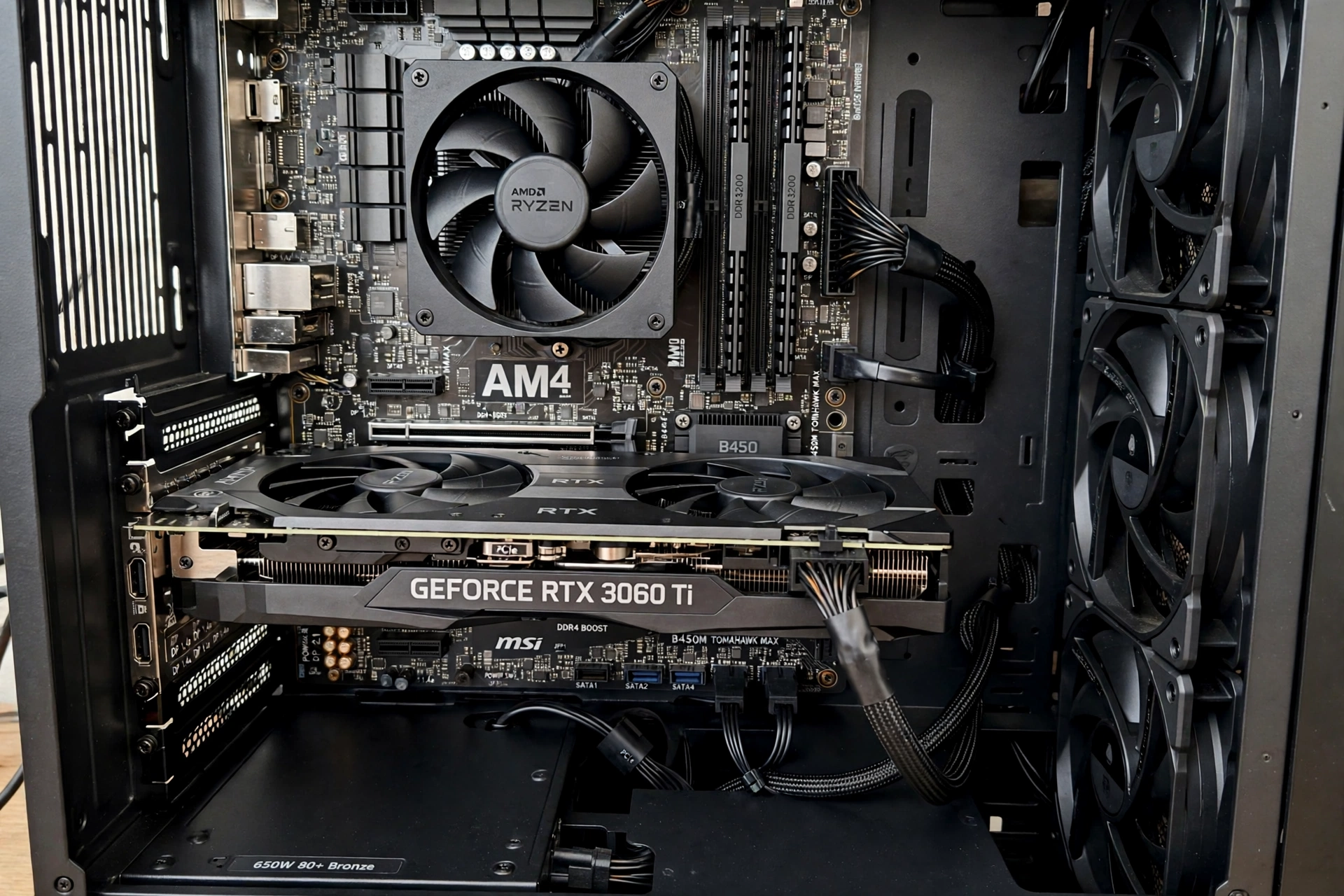
This is the section most rival guides skip, and it is the one that saves budget builders from a quiet performance loss. The Ryzen 5 5500 supports PCIe 3.0 only. That is true even on a B550 board, because the CPU, not the board, sets the link speed for the graphics slot. A B550 board gives you newer features and a better upgrade path to a PCIe 4.0 CPU later, but it does not give your 5500 a PCIe 4.0 graphics link today. On a B450 board, the slot is PCIe 3.0 anyway, so nothing changes.
For full x16 cards like the RTX 3060, RX 6700 XT, and GTX 1660 Super, PCIe 3.0 costs roughly 1 to 3 percent in typical games, according to rival testing summaries. That is small enough to ignore. The problem is x8 cards: the RX 6600, RX 6600 XT, RX 7600, and RTX 4060 all use only 8 PCIe lanes. On PCIe 3.0, an x8 card gets half the bandwidth of an x16 card, and the loss grows to roughly 2 to 3 percent in typical games, and more in texture heavy scenes when the card’s VRAM is full and it must swap data with system memory. That is still not a disaster, and it does not turn a good card into a bad one, but it does change close decisions: if an RX 6600 XT and an RTX 3060 cost nearly the same where you live, the 3060’s x16 interface and 12GB of VRAM make it the better buy on this platform. If the RX 6600 is clearly cheaper, take the small PCIe loss and keep the saving.
Power Supply Notes for Budget AM4 Builds
A budget build fails in boring places, and the power supply is the most boring of all, which is why it gets skipped. Do not skip it. The Ryzen 5 5500 draws only 65W, which helps, but the graphics card sets the requirement. A quality 450W to 550W unit covers every card up to the RTX 3060 and RX 7600 class. The RX 6700 XT class wants a quality 550W to 650W unit, and a used RX 5700 XT wants the same.
Use the simple math from our RTX 50 series power supply guide: add 150 to 200W on top of the GPU power figure for the rest of the system, then add a 20 percent safety buffer. For an RTX 3060 build, that is 170W plus 65W for the CPU plus 150W for everything else, about 385W, times 1.2, about 462W, so a 550W unit is the comfortable pick. Check two physical things before ordering: that the unit has the 8 pin connector your card needs, and that it is a known quality unit, not an unbranded box that came free with a case. A weak power supply causes crashes under load that look exactly like a GPU problem, and no driver update will fix them.
RAM, Settings, and the Rest of the Build
The graphics card gets the attention, but two cheap choices decide whether it performs. First, memory: run 16GB of DDR4 in dual channel mode, two sticks, not one, at 3200 MHz if your board supports it. Single channel memory starves a 6 core CPU and costs frame rate in exactly the CPU heavy scenes where the 5500 is already working hardest. Second, storage: a basic SATA or NVMe SSD for your games removes stutter from texture streaming that can look like a GPU problem. A hard drive as a game drive in 2026 is a false economy.
Settings matter as much as parts. At 1080p, start at high settings, not ultra, in demanding AAA games, and use the upscaling your card supports: DLSS on NVIDIA cards, FSR on AMD cards. Upscaling renders at a lower internal resolution, which lightens the GPU load, but remember that it also raises the frame rate the CPU must feed, so in CPU heavy games it can expose a CPU limit rather than hide it. If raising settings lowers your frame rate but smooths out stutter, your GPU was the limit, which is healthy. If lowering settings does not raise your frame rate, your CPU is the limit, and a faster card will not help. Our guide to how to increase FPS walks through that diagnosis step by step.
Used Market Picks and the Checklist Before You Pay
The used market is where AM4 budget builds shine, because last generation mid range cards are plentiful. The best used values for a 5500 are the RX 5700 XT, the RTX 2060 Super, and the GTX 1660 Super, in that order of speed. All three are honest 1080p cards, and the 5700 XT stretches toward 1440p in older titles. Avoid used cards with 4GB of VRAM, avoid cards sold without photos of the actual unit, and avoid any seller who cannot tell you whether the card was used for mining. Mining alone does not kill a card, but a mined card with worn fans and a tired thermal paste job is a worse bet than a gamer owned card at the same price.
Run this checklist before paying: ask for a photo of the card running a game with a temperature reading, check that all fans spin and no fan rattles, confirm the power connectors match your power supply, and test the card yourself within the return window with a demanding game, not just a desktop. If temperatures climb past the high 80s Celsius under load or the card crashes in the first hour, send it back. A used bargain that needs a fan replacement and new thermal paste is not a bargain once you add the repair cost and your time.
What Not to Buy for a Ryzen 5 5500
Four purchases waste money on this platform. First, flagship cards: an RTX 3070 or faster, or an RX 6800 or faster, will spend much of its time waiting on the CPU at 1080p, and you will have paid flagship money for mid range results. Second, the RX 6500 XT: it uses only 4 PCIe lanes and 4GB of VRAM, which is a brutal combination on a PCIe 3.0 CPU, and rival guides consistently warn against it for exactly this platform. Third, any new card with 6GB or less of VRAM at a price close to an 8GB alternative, because VRAM limits age faster than raw speed. Fourth, a second graphics card for multi GPU gaming, which modern games barely support and which no budget AM4 board handles well. If you have flagship money, spend it on a CPU upgrade first, ideally a Ryzen 5 5600 or better on the same board, and then revisit the GPU.
How to Test Your Own Pairing in 5 Minutes
Calculator percentages are a starting point, not a verdict. Our guide to bottleneck calculators for gaming PCs explains how to use one before buying, and our article on whether bottleneck calculators are accurate explains why two calculators can give two different numbers for the same parts. The real test takes five minutes after you build.
Install MSI Afterburner with its on screen display, or use HWiNFO64, and play your most demanding game for a few minutes. Watch two numbers: GPU usage and CPU usage. If GPU usage sits near 100 percent while CPU usage stays well below that, your graphics card is the limit, which is the healthy state for a gaming PC. If GPU usage jumps around at 60 to 70 percent while one CPU core is maxed out, your CPU is the limit in that game. If both sit low, check temperatures, memory usage, and background apps before blaming either part. Repeat the test in two or three different games, because the limiting part changes by game: a strategy game may be CPU limited while a story driven game on the same PC is GPU limited, and both results can be true at once.
Common Mistakes
- Buying a flagship GPU for a budget CPU and expecting flagship frame rates at 1080p.
- Picking an x8 card without knowing that PCIe 3.0 doubles its bandwidth penalty.
- Buying a B550 board expecting PCIe 4.0 graphics speed from a PCIe 3.0 CPU.
- Running a single stick of memory and wondering why frame times stutter.
- Trusting a single calculator percentage as a verdict instead of testing with usage readings.
- Buying a 4GB card for modern AAA games to save a small amount of money.
- Reusing an old, weak, or unbranded power supply on a new graphics card.
- Judging the pairing from one game, when the limiting part changes by game.
Expert Tips
- For 1080p gaming, the RX 6600 is the safest cheap purchase in this guide, and the RTX 3060 12GB is the safest overall purchase.
- For 1440p on this CPU, buy the RX 6700 XT and play at high settings, not ultra, with upscaling on where it looks good.
- Check your GPU usage in your most played game before buying. If it already sits near full load, your CPU is not the problem.
- For official specifications, check AMD and NVIDIA, and for detailed specification tables check TechPowerUp.
- If a used card and a new card cost nearly the same, take the new card for the warranty, unless the used card is a full tier faster.
- When in doubt between two close cards, take the one with more VRAM and the wider PCIe interface. Both age better than a small clock speed advantage.
Pros and Cons
Pros of building around a Ryzen 5 5500
- Very low platform cost: cheap AM4 boards, cheap DDR4 memory, and a 65W CPU that cools easily.
- Six Zen 3 cores are enough for 1080p gaming with a mid range card.
- A clear upgrade path on the same board to a Ryzen 5 5600 or a faster AM4 chip later.
- Low power draw keeps power supply and cooling costs down.
Cons of building around a Ryzen 5 5500
- PCIe 3.0 only, which penalizes x8 graphics cards more than x16 cards.
- 16MB of L3 cache, half the Ryzen 5 5600, which shows in CPU heavy scenes.
- No integrated graphics, so a dead GPU means no display at all.
- 1440p high refresh gaming will expose CPU limits in demanding titles.
Frequently Asked Questions
What is the best GPU for Ryzen 5 5500?
The RTX 3060 12GB, for most buyers. It balances 1080p performance, 12GB of VRAM, a full x16 interface that suits PCIe 3.0, and DLSS support. The RX 6600 is the best value alternative if the budget is tighter.
Does Ryzen 5 5500 bottleneck RTX 3060?
No, not in any meaningful way for normal gaming. Rival testing summaries report only a small bottleneck, roughly 3 to 5 percent in CPU heavy games, and at 1080p and 1440p the GPU is usually the limiting part, which is healthy. Competitive esports at very high refresh rates can show a CPU limit, but frame rates there are already extremely high.
Is the Ryzen 5 5500 good for 1440p gaming?
Yes, with the right card and honest settings. Pair it with an RX 6700 XT or RTX 3060 Ti class card, play at high settings rather than ultra, and use upscaling where it looks good. It is not a 1440p high refresh CPU, and demanding titles will cap frame rates below what a faster CPU could feed.
Does the Ryzen 5 5500 support PCIe 4.0?
No. The Ryzen 5 5500 supports PCIe 3.0 only, even on a B550 board. The board’s PCIe 4.0 slot will run at PCIe 3.0 speeds with this CPU installed. If PCIe 4.0 matters to you, the Ryzen 5 5600 is the budget step up that supports it.
What power supply do I need for a Ryzen 5 5500 build?
A quality 450W to 550W unit covers cards up to the RTX 3060 and RX 7600 class. The RX 6700 XT class wants a quality 550W to 650W unit. Add 150 to 200W for the rest of the system on top of the GPU figure, then a 20 percent buffer, and check that the unit has the power connectors your card needs.
Should I buy a Ryzen 5 5500 or a Ryzen 5 5600?
Buy the 5500 when the budget is the priority and the GPU is mid range or below, since gaming results at 1080p are close. Buy the 5600 when the price gap is small, because its 32MB of L3 cache and PCIe 4.0 support help in CPU heavy games and with x8 graphics cards. Either chip drops into the same AM4 board.
Key Takeaways
- Best overall GPU for Ryzen 5 5500: RTX 3060 12GB.
- Best value GPU for Ryzen 5 5500: RX 6600.
- Best 1440p stretch GPU for Ryzen 5 5500: RX 6700 XT.
- PCIe 3.0 costs x16 cards roughly 1 to 3 percent, but x8 cards lose more, so check the lane count before buying.
- A B550 board does not give a Ryzen 5 5500 a PCIe 4.0 graphics link.
- Budget a quality 550W power supply for most builds here, 650W for the 6700 XT class.
- Run 16GB of DDR4 in dual channel at 3200 MHz, and test any pairing with GPU and CPU usage readings.
Conclusion
The Ryzen 5 5500 rewards builders who spend in the right place. Put your money into a mid range card with enough VRAM and a wide enough interface, keep your memory in dual channel, and buy a power supply you can trust, and this budget CPU will play modern games at 1080p without drama. Buy the RTX 3060 12GB if you want the safest all round pairing, the RX 6600 if every dollar counts, or the RX 6700 XT if 1440p is genuinely your target. Skip the flagships, skip the 4GB traps, and test your own build with usage readings instead of trusting a single percentage. That is how a budget AM4 build stays a bargain instead of becoming a bottleneck story.

Leave a Reply