

Cyberpunk 2077 System Requirements To run Cyberpunk 2077 today, you need at least an Intel Core i7-6700 or AMD Ryzen 5 1600 CPU, a GTX 1060 (6GB) or RX 580 (8GB) graphics card, 12GB of RAM, and a 70GB SSD. Mechanical hard drives are no longer supported. For a smooth 60 FPS at 1080p, aim for an RTX 2060 Super, RX 5700 XT, or Intel Arc A770, paired with 16GB of RAM.
Few things feel worse than dropping money on a big game, firing it up on a Friday night, and watching it turn into a choppy slideshow. You check your specs, find an old forum post, and still can’t figure out what went wrong.
Key Takeaways
- 12GB RAM is the current official minimum; 16GB is the sensible floor for a new build.
- An SSD is mandatory HDDs aren’t officially supported.
- Ignore 2020-era requirement numbers; they’re obsolete.
- GTX 1060 6GB remains the official minimum GPU.
- For 1440p 60 FPS High, target an RTX 3070 / RX 6700 XT with 16GB RAM.
- Five settings Volumetric Fog, Screen Space Reflections, Shadows, Crowd Density, Subsurface Scattering can buy back 25+ FPS with minimal visual cost.
- Diagnose your actual bottleneck (CPU vs GPU vs VRAM vs RAM) before spending money on an upgrade.
- Ray tracing and especially RT Overdrive reshape the entire hardware equation check those tiers specifically if you plan to use them.
the requirements changed. CD PROJEKT RED rewrote them with Update 2.0, and a lot of pages online plus the specs printed on old game boxes still show 2020-era numbers. If you’re comparing your PC against those, you’re comparing it against the wrong game. This guide uses the current official numbers, plus the practical stuff a spec table alone won’t tell you: which component is actually holding you back, what to do about it, and where you can cut corners without wrecking the game’s look.
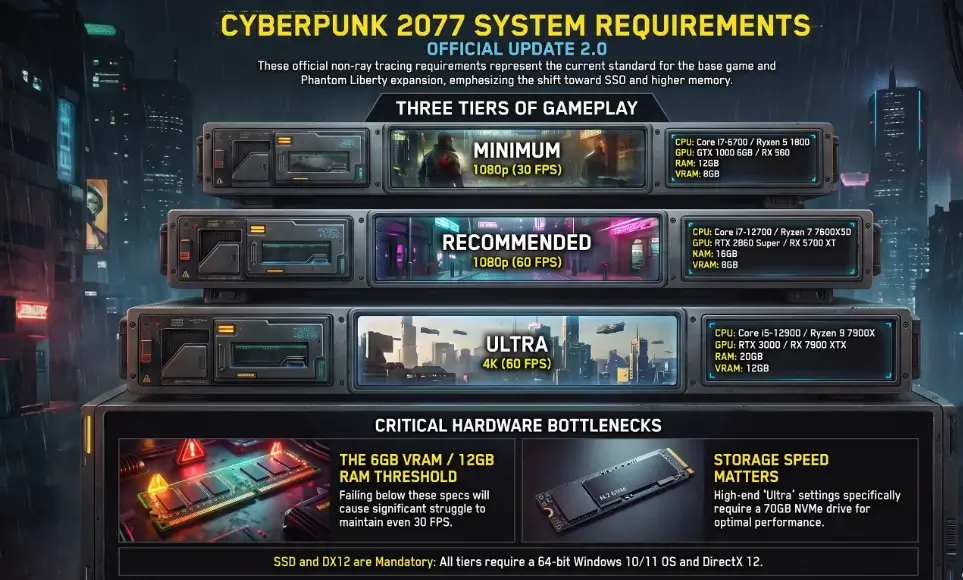
Cyberpunk 2077 System Requirements Official Update 2.0
These are CD PROJEKT RED’s current official numbers for standard gameplay (no ray tracing). They cover both the base game and Phantom Liberty.
| Tier | Resolution | Target FPS | CPU | GPU | VRAM | RAM | Storage |
|---|---|---|---|---|---|---|---|
| Minimum | 1080p Low | 30 FPS | Core i7-6700 / Ryzen 5 1600 | GTX 1060 6GB / RX 580 8GB / Arc A380 | 6GB | 12GB | 70GB SSD |
| Recommended | 1080p High | 60 FPS | Core i7-12700 / Ryzen 7 7800X3D | RTX 2060 Super / RX 5700 XT / Arc A770 | 8GB | 16GB | 70GB SSD |
| Ultra | 4K Ultra | 60 FPS | Core i9-12900 / Ryzen 9 7900X | RTX 3080 / RX 7900 XTX | 12GB | 20GB | 70GB NVMe |
OS requirement: 64-bit Windows 10 or 11 with DirectX 12.
Takeaway: Under 6GB VRAM or under 12GB RAM, and you’ll struggle to hold even 30 FPS on Low.
Why Launch Day Specs No Longer Work
When Cyberpunk 2077 launched in 2020, an old GTX 780 and a spinning hard drive could technically run it. That’s no longer true.
With Update 2.0 and the Phantom Liberty expansion, CD PROJEKT RED overhauled REDengine 4 rebuilt police AI from scratch, added car chases, packed the streets with more crowds, and upgraded the lighting systems. All of that puts a heavier load on your CPU and storage drive. Try running the game on launch-day minimum specs today and you’ll stutter, drop frames, or crash to the desktop.
Old numbers keep surfacing in places you wouldn’t expect: outdated blog posts, the specs printed on physical game boxes, old forum threads, comparison sites running on stale data, even cached search results. CD PROJEKT RED itself warns that boxed copies may still carry outdated specs.
Takeaway: Ignore any 2020-era spec sheet. Only trust numbers explicitly marked for Update 2.0 / Phantom Liberty.
The Missing 1440p Spec Sheet
CD PROJEKT RED’s official table jumps straight from 1080p to 4K, skipping 1440p, the resolution most PC gamers actually use. 1440p pushes roughly 78% more pixels than 1080p, so a GPU that’s fine at 1080p can visibly struggle here.
Realistic build for a locked 60 FPS at 1440p, High settings:
| Component | Recommendation |
|---|---|
| CPU | Ryzen 5 5600, Ryzen 5 7600, or Core i5-12400 / i5-13400 |
| GPU | RTX 3070, RTX 4060 Ti, RX 6700 XT, or RX 7700 XT |
| VRAM | 8GB minimum, 12GB recommended for heavy traffic scenes |
| RAM | 16GB (32GB if you keep Discord/browser tabs open) |
| Storage | 70GB SSD |
Takeaway:
Buy for 1440p based on your FPS target and whether you want ray tracing don’t assume a GPU that sounds right for the resolution will actually hold 60 FPS here.
Ray Tracing and Path Tracing Requirements
Ray tracing gives you wet-asphalt reflections, real neon glow, and accurate shadows but it can cut your frame rate in half without strong hardware and upscaling.
| Tier | Target | CPU | GPU | VRAM | RAM | Storage |
|---|---|---|---|---|---|---|
| RT Low | 1080p @ 30 FPS | Core i7-9700 / Ryzen 5 5600 | RTX 2060 / RX 6800 XT / Arc A750 | 8GB | 16GB | 70GB SSD |
| RT Ultra | 1080p @ 60 FPS | Core i9-12900 / Ryzen 9 7900X | RTX 3080 Ti / RX 7900 XTX | 12GB | 20GB | 70GB NVMe |
| RT Overdrive (Path Tracing) | 4K @ 60 FPS with DLSS 3.5 | Core i9-12900 / Ryzen 9 7900X | RTX 4080 or RTX 4090 | 16GB | 24GB | 70GB NVMe |
What is Ray Tracing Overdrive?
Takeaway:
Leave RT Overdrive off unless you have an RTX 4080+ with DLSS Frame Generation enabled.
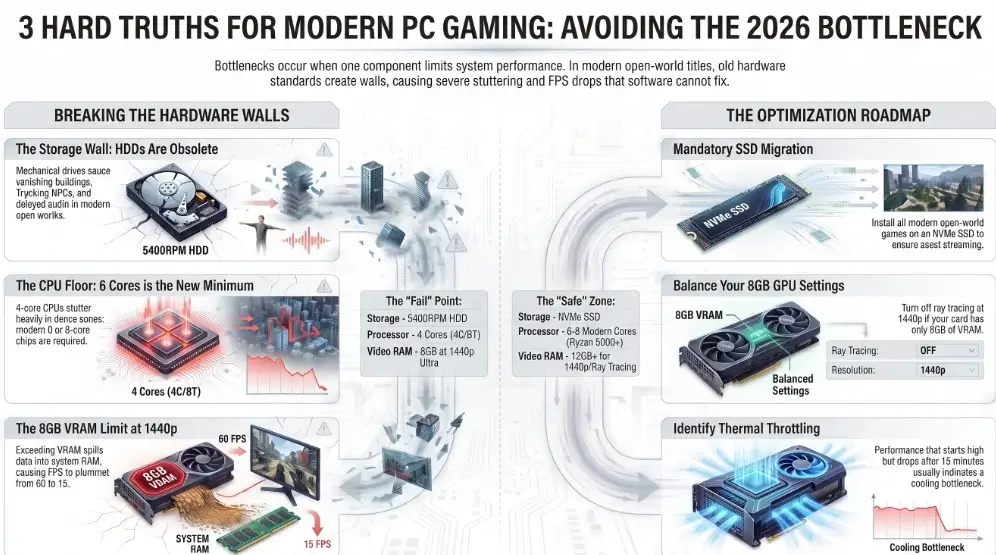
Three Big Hardware Changes You Must Know
1. Hard Drives Are Dead
An SSD isn’t a nice-to-have for faster loading anymore. Cyberpunk’s open world streams buildings, pedestrians, and audio in real time as you drive. HDDs can’t keep up. Installing on one causes:
- Roads and buildings vanishing in front of your car
- Pedestrians frozen in T-poses
- Dialogue playing 5–10 seconds after lips move
- Sudden freezes entering new city blocks
2. The Dogtown CPU Spike
Phantom Liberty’s Dogtown district has densely crowded markets, drones, gang fights, tall buildings. That activity leans hard on your CPU. A processor holding 60 FPS in open desert can dip into the 30s here. Quad-core CPUs (4C/4T or 4C/8T) will stutter heavily; you want a modern 6- or 8-core chip (Ryzen 5 5600, Core i5-12400, Ryzen 7 7800X3D or better).
3. The 8GB VRAM Wall
Popular cards like the RTX 3070, 3060 Ti, and 4060 ship with 8GB VRAM. That’s fine at 1080p but hits a wall at 1440p with ray tracing or Ultra textures once it fills, the game spills textures into system RAM, causing sudden drops from 60 FPS to 15 FPS before recovering.
Takeaway: Keep the game on an SSD, use a CPU with at least 6 modern cores, and turn ray tracing off at 1440p if your card only has 8GB VRAM.
File Size & Storage Guide
- Base game (Patch 2.0+): ~70GB
- Base game + Phantom Liberty: ~94–102GB
- Recommended free space: at least 115GB
Leave breathing room Cyberpunk builds temporary shader/texture caches while you play, and a drive over ~95% full slows down and can trigger stuttering.
SATA SSD vs NVMe: A standard SATA SSD (~500 MB/s) runs the game fine smooth driving, no missing textures. NVMe (3,000+ MB/s) only shaves 2–4 seconds off the first loading screen; in-game frame rates are identical. You don’t need to overspend on the fastest NVMe drive on the shelf.
Takeaway: Any internal SSD handles the streaming engine well just keep 15–20GB free for caches.
Upscalers Explained DLSS, FSR, XeSS
Upscaling renders the game internally at a lower resolution, then reconstructs a sharper image for your display you get a big FPS bump with little visible quality loss.
- Nvidia DLSS (RTX cards only) sharpest image, includes Ray Reconstruction to clean up grainy ray-traced lighting. RTX 40-series owners should also enable DLSS Frame Generation for extra AI-generated frames.
- AMD FSR (works on any GPU) FSR 2.1/3 boosts FPS 20–40% on “Quality” mode with a clean image, great for older Nvidia GTX cards too.
- Intel XeSS (works on any GPU) often has cleaner fine detail and less motion smear than FSR; the best pick if you don’t have an RTX card.
Takeaway: Keep your upscaler on “Quality” mode free performance without turning the screen blurry.
Settings Tweaks That Boost FPS 20 to 30%
You don’t need to drop everything to Low. Most settings barely affect frame rate these five matter most:
| Setting | Default | Recommended | FPS Gain | Visual Cost |
|---|---|---|---|---|
| Volumetric Fog Resolution | Ultra | Medium | +12–15% | Nearly invisible |
| Screen Space Reflections | Ultra | Low/Medium | +10–14% | Slightly softer puddles |
| Cascaded Shadows Resolution | High | Medium | +7–9% | Distant shadows slightly softer |
| Crowd Density (Gameplay menu) | High | Medium | +15–25% in cities | Fewer background NPCs; big CPU relief |
| Subsurface Scattering | High | Medium | +3–5% | Slightly simpler skin tones |
Adjusting just these five can add 25+ FPS while leaving textures, models, and view distance untouched.
Never run the default Ultra preset on a mid-range PC these five tweaks give the biggest return for the least visual cost.
How to Tell if Your CPU or GPU Is the Bottleneck
A common mistake is blaming the GPU for every frame drop. If your GPU sits at 65% usage while one or two CPU cores are pegged near 100%, a new graphics card won’t help your CPU is the limit. The reverse is just as common: GPU near 100% with CPU headroom to spare means trimming CPU-side settings won’t do much.
Quick diagnosis:
- GPU usage near 95–100%? You’re GPU-limited.
- Check individual CPU core/thread loads, not just the total a game can be CPU-limited even when overall usage looks moderate.
- VRAM full? Expect stutter and texture pop-in separate from raw GPU power.
- RAM nearly full? Windows leans harder on your storage drive, slowing everything down.
- Check temperatures thermal throttling quietly clips clock speeds with no obvious warning.
- Change one setting at a time so you know what actually fixed it.
Takeaway: Diagnose before you buy. A new GPU won’t fix a CPU problem, and vice versa.
How to Check Your Own PC Specs
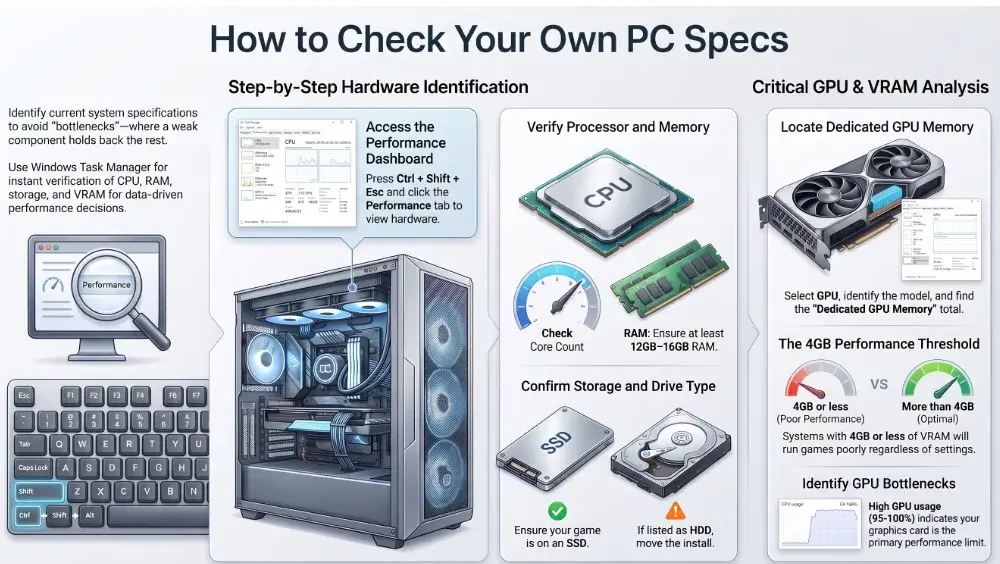
- Press Ctrl + Shift + Esc to open Task Manager.
- Click the Performance tab.
- Click CPU to see your processor model and core count.
- Click Memory to confirm total RAM (need at least 12GB, ideally 16GB).
- Click Disk to confirm SSD vs HDD if it says HDD, move your install.
- Click GPU, check the model in the top right, then look at Dedicated GPU Memory for total VRAM.
Takeaway: If Dedicated GPU Memory shows 4GB or less, the game will run poorly regardless of any other setting.
Steam Deck and Handheld Performance
| Device | Resolution | Preset | Upscaling | Target FPS | Battery |
|---|---|---|---|---|---|
| Valve Steam Deck (LCD/OLED) | 1280×800 | Built-in “Steam Deck” preset | FSR 2.1 or XeSS Balanced | 30–40 FPS | 1.5–2 hrs |
| ASUS ROG Ally (Z1 Extreme) | 1080p or 900p | Custom Medium | RSR or FSR Quality (15–25W) | 45–55 FPS | 1–1.5 hrs |
| Lenovo Legion Go | 1200p (800p integer scale) | Medium | FSR Balanced | 40–50 FPS | 1–1.5 hrs |
Pro tips:
Set Crowd Density to Low (handheld chips share power between CPU and GPU, so fewer NPCs means real battery savings) and cap your refresh rate at 30 or 40Hz to stop stuttering and keep the device cooler. Don’t compare handheld FPS numbers against desktop results directly — a handheld at a lower resolution/FPS target can still feel great despite the hardware gap.
Takeaway:
Use the built-in Steam Deck preset, Crowd Density Low, and a locked 30–40Hz refresh rate for steady handheld play.
Common Mistakes to Avoid
- Installing on an external USB drive USB bandwidth is too slow and causes invisible roads and freezes.
- Running single-channel RAM one 16GB stick runs slower than two 8GB sticks; dual-channel gives 10–15% better minimum frame rates.
- Leaving Chrome or Discord open background apps eat 2–4GB of RAM you may not have to spare on a 12–16GB system.
- Enabling ray tracing on budget cards RTX 3050, RTX 2060, and RX 6000-series cards lack the muscle; frame rates will tank.
- Compared against 2020 minimum specs outdated; always check the Update 2.0 numbers.
- Reading Frame Generation numbers as native performance they’re not directly comparable.
Troubleshooting Crashes and Stuttering
Game crashes instantly on launch: Your CPU may lack AVX (Advanced Vector Extensions) support some older server Xeons and early AMD FX chips don’t have it, and the game requires it to even start.
Dialogue plays out of sync / audio crackles: Confirm the game’s on an internal SSD, then check Windows Sound settings set output to 24-bit, 48000Hz. Higher sample rates (96000Hz, 192000Hz) can desync the audio engine.
Micro-stutters while driving: Lower Crowd Density to Medium or Low first. If you’re on a slower SATA SSD, try enabling “HDD Mode” in the gameplay menu but never enable it on a fast NVMe drive, since it can actually reduce streaming efficiency there.
Crashes right after a patch: If you run mods, check them first CD PROJEKT RED has warned that pre-2.0 mods can break after updates until they’re refreshed.
Takeaway: If the game won’t even launch, check AVX support and update your GPU drivers before anything else.
FAQs
What are the minimum Cyberpunk 2077 requirements?
A 64-bit Windows 10/11 system with a Core i7-6700 or Ryzen 5 1600, GTX 1060 6GB / RX 580 8GB / Arc A380, 12GB RAM, and a 70GB SSD targeting 1080p Low at 30 FPS.
Can I run Cyberpunk 2077 on an HDD?
No. HDDs aren’t officially supported as of Update 2.0. The game may still boot, but expect missing roads, floating characters, delayed audio, and freezing.
Can Cyberpunk 2077 run on 8GB of RAM?
No it’s below the current 12GB minimum. You’ll likely see stutter and rougher frame-time consistency even if it technically boots.
How much space does it take with Phantom Liberty?
About 70GB for the base game, 94–102GB with Phantom Liberty installed. Keep ~115GB free for patches and caches.
Can a GTX 1060 or RX 580 still play it?
Yes, at 1080p Low, around 30 FPS. Turning on AMD FSR (Balanced) can push that closer to 45–50 FPS.
Why does Ray Tracing Overdrive need an RTX 4080?
It runs full path tracing calculating every light bounce in real time. Hitting 4K/60 requires an RTX 4080 or 4090 plus DLSS 3.5 Frame Generation.
Can the Steam Deck run it smoothly?
Yes 30 to 40 FPS is achievable using the built-in Steam Deck preset, Crowd Density set to Low, and FSR 2.1 Balanced.
Is Phantom Liberty more demanding than the base game?
No both run on the same Update 2.0 baseline requirements.
Conclusion
To run Cyberpunk 2077 smoothly, don’t judge your PC by the GPU alone. Update 2.0 increased hardware demands, making an SSD, enough RAM, and a balanced CPU and GPU important. For a playable experience, target 1080p Low at 30 FPS. For smoother gaming, aim for 1080p High at 60 FPS. For 1440p, 4K, Ray Tracing, or Overdrive, check your CPU, GPU, VRAM, RAM, and storage together. Before upgrading, use the bottleneck checks above. A quick check can help you find the real performance problem and avoid spending money on the wrong hardware.

Leave a Reply