
NVIDIA’s DLSS 4.5 gives you the clearest, most stable picture. It uses special chips called Tensor Cores and a new AI model. AMD’s FSR 4 (called “Redstone”) has gotten much better too. But its best parts like frame generation and better lighting only work on the newest AMD cards (RX 9000). The upscaling part, now called FSR Upscaling 4.1, officially works on older RX 7000 cards too, starting June 2026. RX 6000 cards are getting it too, but not until early 2027.
Introduction
Games look amazing today. But fancy lighting and 4K screens can slow down even a strong graphics card. That’s why upscaling was made. Upscaling means the game draws the picture at a smaller size first. Then, smart software stretches it back up to fit your screen. You get a big speed boost, and the picture still looks good. The two big names in upscaling are NVIDIA’s DLSS and AMD’s FSR. Both got big updates. NVIDIA released DLSS 4.5 in early 2026. AMD has been improving FSR 4 all year under the name Redstone. This guide explains what each one does, how they compare, and which one is right for your graphics card.
How They Work DLSS vs FSR
| Feature | NVIDIA DLSS 4.5 | AMD FSR 4 (Redstone) |
|---|---|---|
| AI Technology | New AI Model (2nd Generation) | Smart Learning Model |
| Hardware | Runs on NVIDIA Tensor Cores | Runs on AMD RDNA 3 & RDNA 4 GPUs |
| Image Quality | Steadier picture with sharper details | Much less ghosting and cleaner visuals |
| Compatibility | Requires RTX GPUs with Tensor Cores | Works on supported RDNA 3 & RDNA 4 graphics cards |
What Is DLSS?
DLSS is NVIDIA’s own AI tool for making pictures sharper. Instead of using simple math to guess missing pixels, it uses AI that was trained on NVIDIA’s own powerful computers.
DLSS 4.5 uses a brand-new AI model. NVIDIA trained it using years of past research and a much bigger set of training data. This means:
- Cleaner edges
- Better fine details
- A steadier picture when things move fast
DLSS works on every RTX card (the 20, 30, 40, and 50 series). But RTX 40 and 50 cards run it best.
What Is FSR?
FSR started as a simple tool. It used fixed math formulas, not AI. This meant it worked on almost any graphics card, but the picture often had small glitches.
FSR 4 is part of AMD’s “Redstone” update. It now uses real AI learning instead of fixed math. AMD trained this AI using its own powerful data-center computers. The goal is the same as DLSS: sharper detail, steadier motion, and fewer glitches.
Redstone includes several tools:
- Upscaling (making the picture sharper)
- Frame generation (making extra frames)
- Ray regeneration (better lighting on shiny things)
- Radiance caching (better lighting overall)
DLSS 4.5 runs a new AI model on special NVIDIA chips. FSR 4 is AMD’s first real AI upscaler, built to catch up to DLSS.
Which Graphics Card Works With DLSS vs FSR
This is the most important part, because it decides what you can actually use.
DLSS and Your Card
DLSS needs Tensor Cores, so it only works on NVIDIA cards:
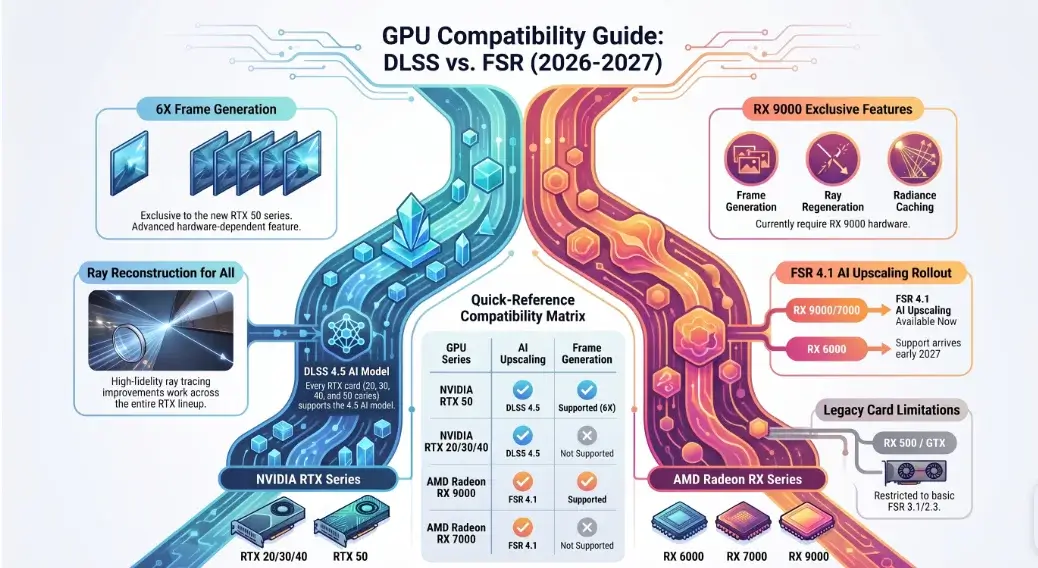
- DLSS Upscaling: Works on every RTX card (20, 30, 40, 50 series). All of them get the new 4.5 AI model.
- DLSS Ray Reconstruction: Works on all RTX cards too.
- 6X Frame Generation: Only works on RTX 50 cards, because it needs new hardware.
FSR and Your Card
AMD’s rollout has been slower and more spread out:
- FSR Upscaling 4.1 (AI upscaling): At first, only worked on RX 9000 cards. AMD officially added RX 7000 (RDNA 3) support on June 22, 2026, through a driver update. Over 300 games support it. RX 6000 (RDNA 2) cards are getting it too, but not until early 2027.
- A small trade-off on RX 7000: Because RX 7000 cards don’t have the same AI hardware as RX 9000, AMD had to rebuild the model to run differently on them. The picture quality is meant to match RX 9000 closely, but real-world tests show it runs a bit slower than the older FSR 3.1 did on the same card. You get a better picture, but not always more speed.
- Frame Generation, Ray Regeneration, and Radiance Caching: Still only work on RX 9000 cards. AMD has not confirmed when (or if) these will come to RX 7000 or RX 6000.
- Older cards (RX 500, GTX): These use the older, simpler versions of FSR (3.1 and 2.3). They don’t get the same improvements.
Any RTX card gets the new DLSS 4.5 picture quality. RX 7000 and RX 9000 Radeon cards now officially get AI-based FSR Upscaling but the full toolkit, including frame generation, is still RX 9000 only. RX 6000 owners have to wait until early 2027.
DLSS vs FSR Quick Compare
| Feature | NVIDIA DLSS 4.5 | AMD FSR 4 (Redstone) |
|---|---|---|
| How it works | New AI model (2nd generation) | AI learning model |
| Cards needed for everything | Any RTX card (RTX 50 required for 6× Multi Frame Generation) | Radeon RX 9000 series for the complete toolkit |
| AI upscaling works on | All RTX graphics cards | RX 7000 & RX 9000 (RX 6000 support planned for early 2027) |
| Steady picture in motion | Excellent image stability | Much better than previous versions, with minor artifacts remaining |
| Ghosting | Very well controlled | Major improvement, but still behind DLSS in some scenes |
| Free & Open Source | ❌ No | ✅ Yes (GPU Open) |
| Frame Generation | Dynamic / 6× Multi Frame Generation | FSR Frame Generation |
DLSS vs FSR Picture Problems
A fast frame rate is not the whole story. How clean the picture looks also matters.
1. Flickering on Small Details
Have you seen a fence or leaves seem to flicker as the camera moves? That happens when the AI can’t keep the same picture steady from frame to frame.
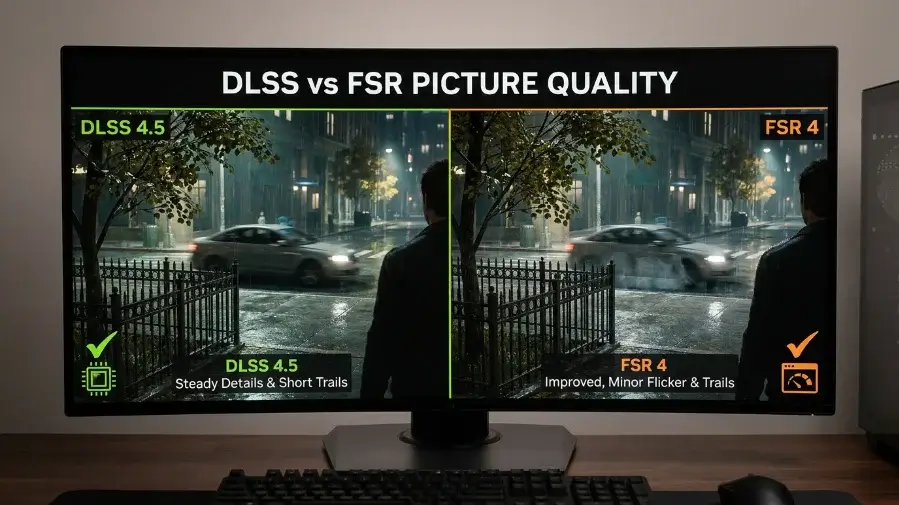
- DLSS 4.5: Good at remembering patterns like fences and leaves, so they stay steady.
- FSR 4: Much better than before. You might still see a little flicker in shiny scenes, like wet streets at night.
2. Ghosting (Trails Behind Moving Things)
Ghosting happens when the AI uses old frame data but doesn’t fully clear it out. You see a faint trail behind fast-moving things, like a bird or a car.
- DLSS 4.5: Tracks moving objects separately from the background, so trails stay short.
- FSR 4: This is one of its biggest improvements. It handles moving objects much better than before.
3. Fizzing at Edges
When your character walks past something and then steps away, the AI has to guess what was behind it. If it guesses wrong, you see flickering at the edges.
Both tools handle this well now. DLSS 4.5 is a tiny bit faster at fixing this in fast-paced games, because of its special chips. FSR 4 has closed most of the gap with DLSS. DLSS 4.5 still wins slightly in the hardest cases, like thin wires or lots of reflections.
Frame Generation and Lag
Both tools can also create brand-new frames using AI, to make the game feel smoother.
NVIDIA’s Way
DLSS 4.5 has Dynamic Multi Frame Generation. A new 6X mode (only on RTX 50 cards) can add up to five AI-made frames for every one real frame. This aims for very high frame rates on fast monitors. To stop this from feeling laggy, NVIDIA also uses NVIDIA Reflex, which keeps your controls feeling quick.
AMD’s Way
AMD uses FSR Frame Generation, now rebuilt with AI. This means the extra frames look better and have fewer visual tears than before. AMD pairs this with Radeon Anti-Lag to help with delay.
Important note: More fake frames does not mean less lag. Frame generation makes the game look smoother, but it does not make your controls feel faster it can even add a tiny bit of delay. If a game already runs below 60 fps without help, turning on strong frame generation will look smoother but still feel slow. It’s best to have at least 60 real frames per second before turning frame generation on.
DLSS vs FSR Guide Get the Best Picture
The default settings in a game are not always the best. Here’s how to fix that.
Pick the Right Setting for Your Screen
- 4K screens: Use Quality mode. It looks sharp and still gives a big speed boost.
- 1440p screens: Use Quality or Balanced mode. Skip Performance mode the starting picture is too small and looks soft.
- 1080p screens: Stick to Quality mode. There aren’t enough pixels to push it further.
Turn On the Matching Lag Tool
Always turn on a lag-reducing tool with frame generation:
- DLSS → turn on NVIDIA Reflex.
- FSR → turn on AMD Anti-Lag.
Don’t Overdo the Sharpening Slider
Many games have a sharpness slider.
- Keep it between 10% and 30%. Higher settings can create white outlines around objects and make the picture look rough.
Try Both Tools in Your Game
Some games show a bigger difference between DLSS and FSR than others. If a game offers both, try switching between them in a busy scene, like a city street. The better choice can change from game to game.
DLSS vs FSR Mistakes to Avoid
-
- Thinking FSR 4’s full quality works on any Radeon card. Frame generation, ray regeneration, and radiance caching still need an RX 9000 card. RX 7000 gets the AI upscaler, but not the rest. RX 6000 and older cards still use the simpler FSR 3.1 or 2.3.
- Using strong upscaling on a 1080p screen just to gain frames. This usually makes the picture blurry. Try lowering a graphics setting instead.
- Using two sharpening tools at once. Don’t turn on both the in-game sharpening and your graphics driver’s sharpening. Together, they make the picture look too harsh.
- Turning on frame generation below 60 fps. This makes the game look smooth but still feel slow, and can make lag more noticeable.
- Skipping driver updates. Both NVIDIA and AMD often improve picture quality through software updates, not just game patches. Keep the NVIDIA App or AMD Software updated.
DLSS vs FSR Good and Bad Points
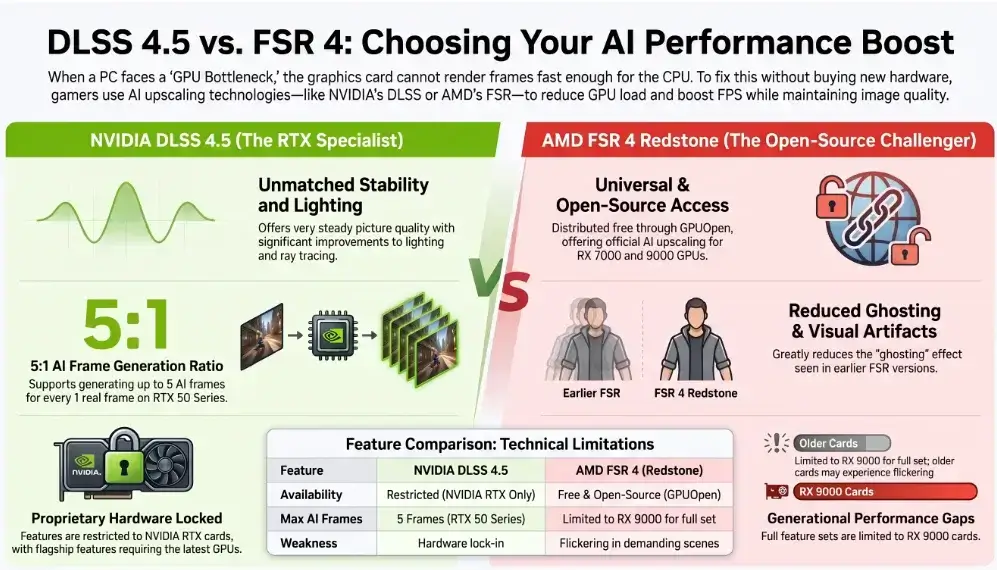
| Technology | Good Points ✅ | Bad Points ❌ |
|---|---|---|
| NVIDIA DLSS 4.5 |
|
|
| AMD FSR 4 (Redstone) |
|
|
Best Settings for Different Games
- Fast shooter games (like Valorant, Apex Legends, Call of Duty): Turn upscaling off, or use Quality mode with frame generation off. A real, native picture with Reflex or Anti-Lag gives you the fastest response more important than extra smoothness in these games.
- Story-driven games (like Cyberpunk 2077, Alan Wake 2): Use Balanced mode. Turn on Ray Reconstruction (or Ray Regeneration on AMD) and frame generation. This combo makes heavy lighting effects playable at high resolutions.
Key Takeaways
- AI vs. AI: DLSS 4.5 runs a new AI model on special NVIDIA chips. FSR 4 runs its own AI model, built for RDNA 3 and RDNA 4 AMD cards.
- Picture steadiness: DLSS still wins in the hardest scenes, but FSR 4 has closed most of the gap.
- Check your exact card, not just the brand. RTX owners get DLSS 4.5 on any RTX card. Radeon owners now get AI upscaling on RX 7000 and RX 9000, but the full toolkit is RX 9000 only for now.
- Frame generation is not free speed. It smooths the picture but doesn’t reduce lag. Pair it with a real frame rate of 60 fps or higher.
FAQs
Can I use DLSS on an AMD Radeon card? No. DLSS needs Tensor Cores, which are special chips found only in NVIDIA RTX cards.
What’s the difference between DLSS 4.5 and FSR 4? DLSS 4.5 uses a new AI model on NVIDIA’s Tensor Cores and works on all RTX cards. FSR 4, part of AMD’s Redstone update, uses AI built for RDNA 3 and RDNA 4 cards. But the full toolkit frame generation, ray regeneration, and radiance caching is only for RDNA 4 (RX 9000) cards.
Does FSR 4 work on older cards? FSR Upscaling 4.1’s AI upscaling officially works on RX 9000 and RX 7000 cards, since June 2026. RX 6000 cards are set to get it in early 2027. Older Radeon cards and all NVIDIA cards use older, simpler versions of FSR, like 3.1 or 2.3. These don’t have the same improvements.
Conclusion
The DLSS vs FSR question isn’t really about which one is “better” anymore. It’s about what your graphics card can do. DLSS 4.5 stays more consistent across most scenes, thanks to NVIDIA’s special chips. AMD’s move to real AI with FSR 4 has closed a lot of the gap, and now more Radeon owners can use AI upscaling than before. Match your settings to your screen size, keep your drivers updated, and remember: the real differences show up when things are moving, not in a still picture.

Leave a Reply