
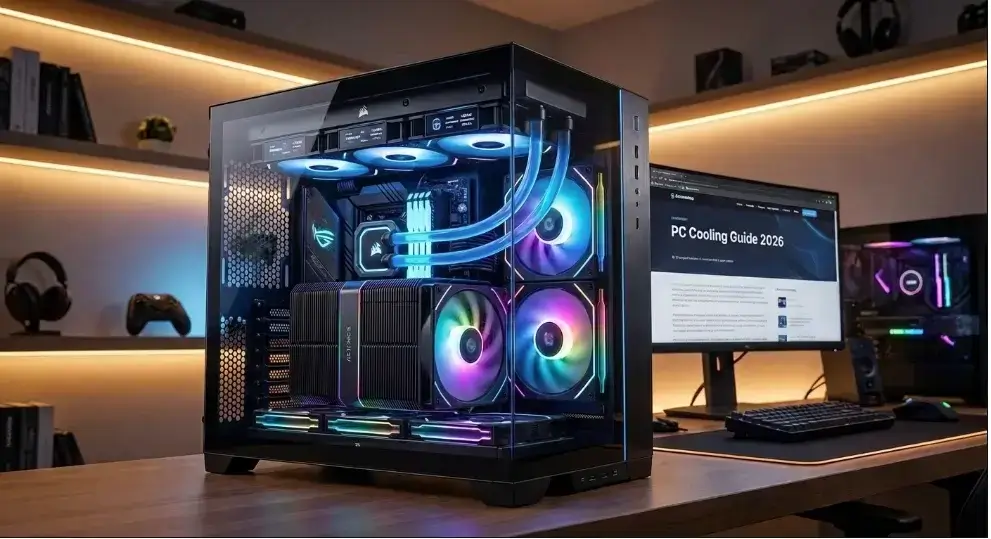
For most CPUs even hot-running ones a premium dual-tower air cooler now delivers AIO-level temperatures, runs quieter, and never needs replacing. Reach for a 360mm AIO liquid cooler only if you’re running a sustained heavy workload over 200W (like video encoding or AI inference) or your case genuinely can’t fit a large air cooler.
You just spent serious money on a brand new processor. You fire up your favorite game, and within minutes, your PC sounds like a jet engine spooling up. Then the stuttering starts. Here’s the truth modern CPUs from AMD and Intel aren’t like the chips from five years ago. They cram far more power into a much smaller space, and that means far more heat. Cooling advice that worked in 2020 simply doesn’t hold up on a 2026 PC build. When heat can’t escape fast enough, your CPU throttles itself deliberately slowing down to protect itself from damage. Building a PC should feel exciting, not like defusing a bomb every time you boot up a game.
This guide walks you through exactly how to choose the right cooler, dial in your case airflow, and keep your hardware running cold, quiet, and fast.
Modern CPU Heat Profiles
Processors changed drastically in recent years. Heat no longer sits perfectly in the center of the chip.
AMD AM5 (Ryzen 7000 & 9000 Series) AMD uses a chiplet design. The hottest parts of the processor sit closer to the bottom edge. Standard coolers expect the heat to be dead center. To fix this, use an “offset mounting bracket.” This shifts your cooler down slightly, which can drop your temperatures by up to 3°C instantly.
Intel LGA 1851 (Core Ultra 200 Series) Intel processors are long and rectangular. Often, the standard motherboard locking arm bends the chip slightly. This prevents your cooler from sitting perfectly flat against the metal. Using an aftermarket “contact frame” holds the CPU flat. This is a cheap upgrade that drastically improves cooling.
Pro Tip: Always check if your specific CPU socket benefits from offset mounts or contact frames before installing your cooler. It is the easiest way to lower temperatures.
Air Cooling vs AIO Liquid Cooling
Picking your cooler is the biggest thermal choice you will make.
Dual-Tower Air Coolers
Air coolers use metal pipes to pull heat away from the CPU. Fans then blow that hot air away.
- Pros: They never leak, cost less, and last for over ten years.
- Cons: They are bulky. Large towers can block tall RAM sticks.
- Best for: Most gaming builds, budget builds, and CPUs that don’t run sustained heavy loads.
All In One (AIO) Liquid Coolers
If you want maximum thermal overhead under sustained workloads, a modern pc cooling system liquid setup (AIO) uses active pumps to transfer heat away from the CPU rapidly.
- Pros: Strong at handling sustained high heat. They look very clean and never block your RAM.
- Cons: They cost more. The water pump usually dies after 4 to 6 years.
- Best for: Sustained heavy workloads over 200W, dense small-form-factor cases, and builders who want a clean, RGB-friendly look.
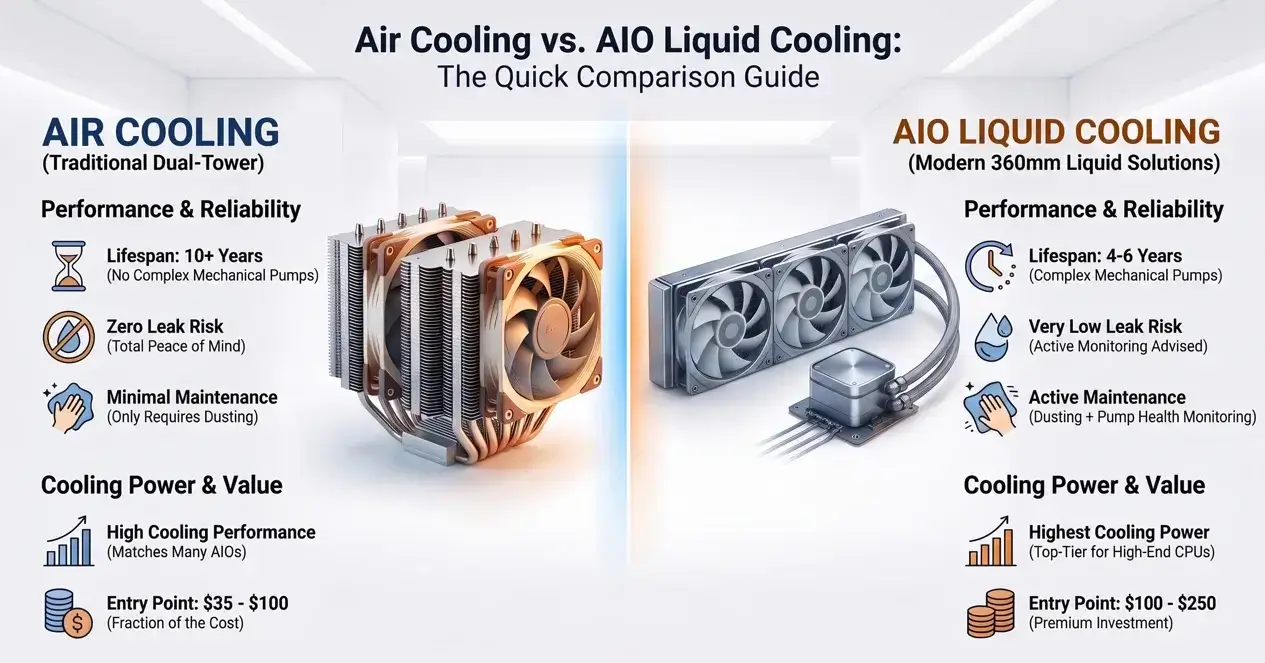
Air Cooling vs. AIO Liquid Cooling Quick Comparison
| Feature | Dual-Tower Air Cooler | 360mm AIO Liquid Cooler |
|---|---|---|
| Cooling Power | High (matches many AIOs) | Highest, at the top tier |
| Lifespan | 10+ Years | 4 to 6 Years |
| Maintenance | Dusting only | Dusting & pump monitoring |
| Risk of Leaks | Zero | Very Low |
| Average Price | $35 – $100 | $100 – $250 |
The 2026 Air Cooling Comeback
Here’s something a lot of older guides still get wrong: the idea that liquid cooling automatically beats air cooling has quietly fallen apart. For years, the rule of thumb was simple air for budget builds, liquid for anyone who wanted real performance. That advice made sense back in 2022 or 2023. It doesn’t hold up anymore.
Premium dual-tower air coolers have closed the gap with entry and mid-range AIOs almost completely. A well-reviewed single-tower cooler in the $35–$60 range now competes directly with 240mm liquid coolers in independent testing, and flagship air coolers push that fight all the way up against 360mm units. The only place liquid still holds a clear, undisputed lead is the very top tier big 360mm and 420mm radiators cooling the hottest CPUs under sustained, all-day workloads.
Why did this shift happen? Two things changed at once:
- CPUs got smarter about power. Chips like AMD’s Ryzen 9000 and X3D parts run efficiently most of the time, with short, sharp spikes under boost rather than constant maximum heat. Intel’s Core Ultra 200 series is also far more predictable than the “furnace” chips from a few generations back.
- Air cooler engineering got better. Denser fin stacks, better heat pipe layouts, and stronger stock fans mean today’s best air coolers move heat almost as fast as a mid-range pump-and-radiator setup without a pump that can fail.
What this means for your build:
- If you’re gaming, doing everyday multitasking, or running typical creative work, a high-end air cooler will match AIO temperatures in real-world use, run quieter, and never leave you replacing a dead pump five years from now.
- If you’re running sustained, all-day heavy loads think 3D rendering, video encoding, or AI inference a 360mm AIO still earns its price tag by holding the line where air starts to fall behind.
- If you’re chasing a specific aesthetic (RGB tubing, a clean case with no tower blocking the view), that’s a valid reason to pick liquid too just go in knowing it’s a style choice as much as a thermal one.
Don’t buy liquid cooling just because it sounds more powerful on the box. Check independent benchmark reviews for your exact CPU model for most 2026 builds, the “budget” air cooler and the “premium” AIO end up within a couple of degrees of each other.
Before deciding on cooling hardware, make sure you decide whether you want to assemble it yourself or buy pre-configured by reading our Prebuilt vs Custom PC | Which Is Best in 2026? comparison.
Important Cooler Specifications
Box labels are full of confusing marketing hype. Ignore the buzzwords and look at these two numbers instead.
Static Pressure vs. Airflow (CFM) PC fans do different jobs.
- Static Pressure (mm H2O): These fans push air strongly through tight obstacles. You need these for liquid cooling radiators and thick air cooler metal fins.
- Airflow (CFM): These fans move massive amounts of air in wide-open spaces. Use these as plain case fans to pull fresh air inside.
Noise Levels (dBA) Nobody wants a loud PC. Look for fans rated under 30 dBA at maximum speed. Setting a quiet “fan curve” in your motherboard BIOS is much smarter than just buying the most expensive cooler on the shelf.
Mastering Case Airflow
Having a top tier CPU cooler is useless if your overall pc cooling system isn’t configured properly to clear hot air out of the case.
Positive vs. Negative Pressure
- Positive Pressure: You have more fans blowing air IN than blowing air OUT. Extra air escapes through cracks in the case, pushing dust away. Always aim for this setup.
- Negative Pressure: You have more fans blowing OUT than IN. Your case acts like a vacuum, sucking dust through every open crack. Avoid this.
The Ideal Fan Layout
- Front: 2 or 3 intake fans (pulling fresh air in).
- Bottom: 1 or 2 intake fans (blowing cold air up toward the graphics card).
- Top: 2 or 3 exhaust fans (pushing hot air out).
- Rear: 1 exhaust fan (pushing hot air out).
Try the tissue paper test. Hold a single square of single-ply toilet paper near the gaps at the back of your case. If the paper blows away from the case, you have good positive pressure. If it gets sucked against the metal, you have negative pressure.
Thermal Paste vs. Phase Change Pads
Thermal paste fills invisible, microscopic gaps between the CPU and the cooler. Without it, your PC will overheat and shut down in seconds.
Traditional Paste Application Standard thermal paste works great. Place a single, pea-sized drop dead in the center of the processor. When you screw the cooler down, the physical pressure spreads it perfectly.
The 2026 Upgrade: Phase Change Pads Enthusiasts are moving away from messy wet paste. Products like the Honeywell PTM7950 are solid pads at room temperature. When your PC heats up, the pad melts to fill the gaps. When you turn the PC off, it turns solid again. It never dries out, never pumps out over the edges, and never needs replacing.
Installation Checklist & Clearances
Many builders buy parts that simply do not fit together. Check these measurements before you click buy.
Physical Clearances
- RAM Height: Big air coolers often hang directly over the RAM slots. Ensure your RAM is “low-profile” or check the cooler’s exact clearance specs online.
- Case Width: Measure the inside of your case. Make sure a tall air cooler will not hit your glass side panel.
AIO Radiator Orientation
If you buy an AIO, how you mount it matters. AIO loops always contain a tiny bit of trapped air. Air bubbles naturally float to the highest point in the loop.
- Good: Mount the radiator flat at the top of the case.
- Good: Mount the radiator at the front, with the tubes at the bottom.
- Bad: Mount the radiator at the bottom of the case. Air gets trapped in the CPU pump. This causes loud buzzing and kills the pump early.
Key Takeaways
- Most builds don’t need liquid cooling anymore. A premium dual-tower air cooler now matches AIO temperatures for typical gaming and everyday use, costs less, and never has a pump to fail.
- Save the AIO for sustained heavy loads. Pick a 360mm liquid cooler only if you’re doing all-day rendering, encoding, or AI inference or if your case genuinely can’t fit a large air tower.
- Socket-specific fixes matter more than most people realize. An offset mount for AM5 or a contact frame for LGA 1851 can drop temperatures by several degrees for a few dollars often more impactful than upgrading the cooler itself.
- Case airflow decides the outcome. Even the best cooler underperforms in a case with negative pressure or poor fan layout. Get positive pressure right first.
- Phase change pads (like PTM7950) are the low-maintenance upgrade. They never dry out and remove one more thing you’ll need to service down the road.
- When in doubt, check current benchmarks for your exact CPU rather than following the old “liquid always wins” assumption in 2026, that gap has mostly closed.
Choosing the right cooler is just one piece of the puzzle. Pairing the wrong processor and graphics card can waste your hardware’s potential, no matter how cold it runs. Make sure your parts are perfectly balanced by testing your setup in a bottleneck calculator before you finalize your build.
Troubleshooting Common Thermal Issues
Even careful builders run into problems. Here is how to fix the most common issues quickly.
High Idle Temperatures (Above 50°C)
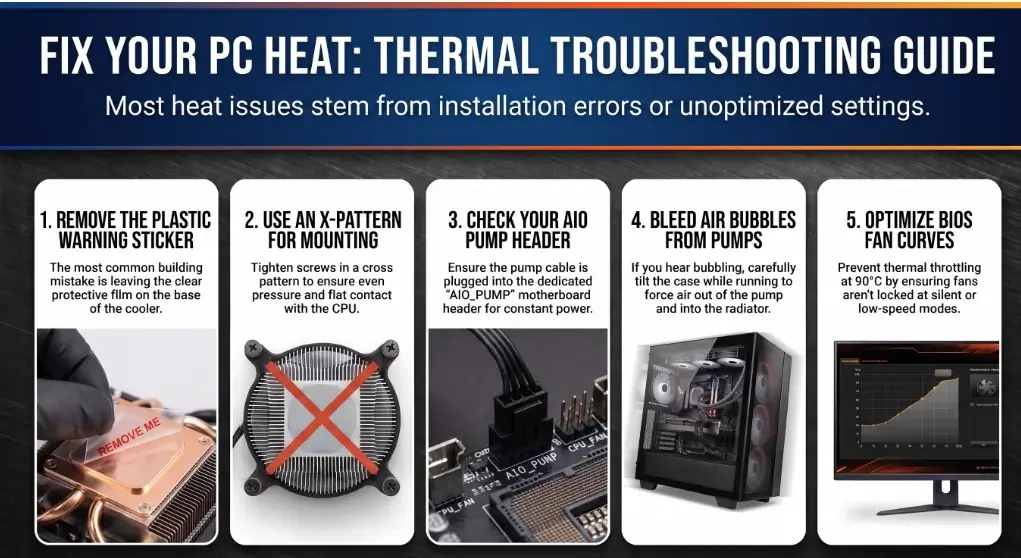
- Did you peel the clear plastic warning sticker off the bottom of the cooler? (This is the most common mistake in PC building).
- Are the mounting screws tightened evenly? Always tighten screws in an X-pattern so the cooler sits flat.
- Is the pump cable plugged directly into the “AIO_PUMP” header on the motherboard?
Loud Bubbling Noises from an AIO Air is trapped in your pump block. While the PC is running, carefully tilt the entire case back and forth a few times. This forces the air bubbles to travel out of the pump and up into the radiator.
Thermal Throttling While Gaming If your CPU hits 90°C and slows down, check your fan curves in the BIOS. The fans might be locked at a low, silent speed. Also, check that your graphics card isn’t dumping all its exhaust heat directly into your CPU air cooler.
If your CPU isn’t thermal throttling but you’re still facing frame drops, check out our guide on How to Increase FPS in 2026 | Every Fix Ranked by Impact to optimize your GPU and Windows settings.
Frequently Asked Questions
Do I still need an AIO in 2026, or can air cooling keep up? For most builds, a premium air cooler keeps up just fine. Liquid cooling only pulls ahead during sustained, all-day heavy workloads or in the very top CPU tier. If you’re a typical gamer or everyday user, a good air cooler is no longer a compromise.
Does a 360mm AIO cool better than a 240mm AIO? Yes. A 360mm radiator has more metal surface area and an extra fan. It gets rid of heat much faster, keeping high-end CPUs cooler during heavy workloads.
How often should I change my thermal paste? For standard wet paste, every two to three years is a safe rule. If you notice your temperatures slowly creeping up over a few months, the paste has likely dried out. Phase change pads do not need to be replaced.
Is liquid cooling dangerous for my PC? Modern AIO coolers are extremely safe. They are tightly sealed at the factory and very rarely leak. Custom water cooling loops carry a much higher risk, but standard AIOs are trusted by millions of everyday builders.
Should my fans pull air or push air through the radiator? Pushing air through the radiator is slightly more efficient and much easier to dust. However, the actual temperature difference between pushing and pulling is usually less than 2°C.
Conclusion
Cooling isn’t something to figure out after your PC starts screaming it’s part of the build itself. Pick air if you’re under 200W, go liquid if you’re pushing past it, and get the small details right offset mounts, good airflow, proper radiator placement. Do that, and your PC stays cold, quiet, and fast for years. Before you call the build finished, run a quick bottleneck check to make sure every part is pulling its weight.

Leave a Reply